Nano Banana 2 Lite in Nenis: Fast AI Images at 3–4 Credits
A practical guide to Nano Banana 2 Lite in Nenis: when to use Google's fastest low-cost Gemini image model for drafts, edits, references, and high-volume creative work.
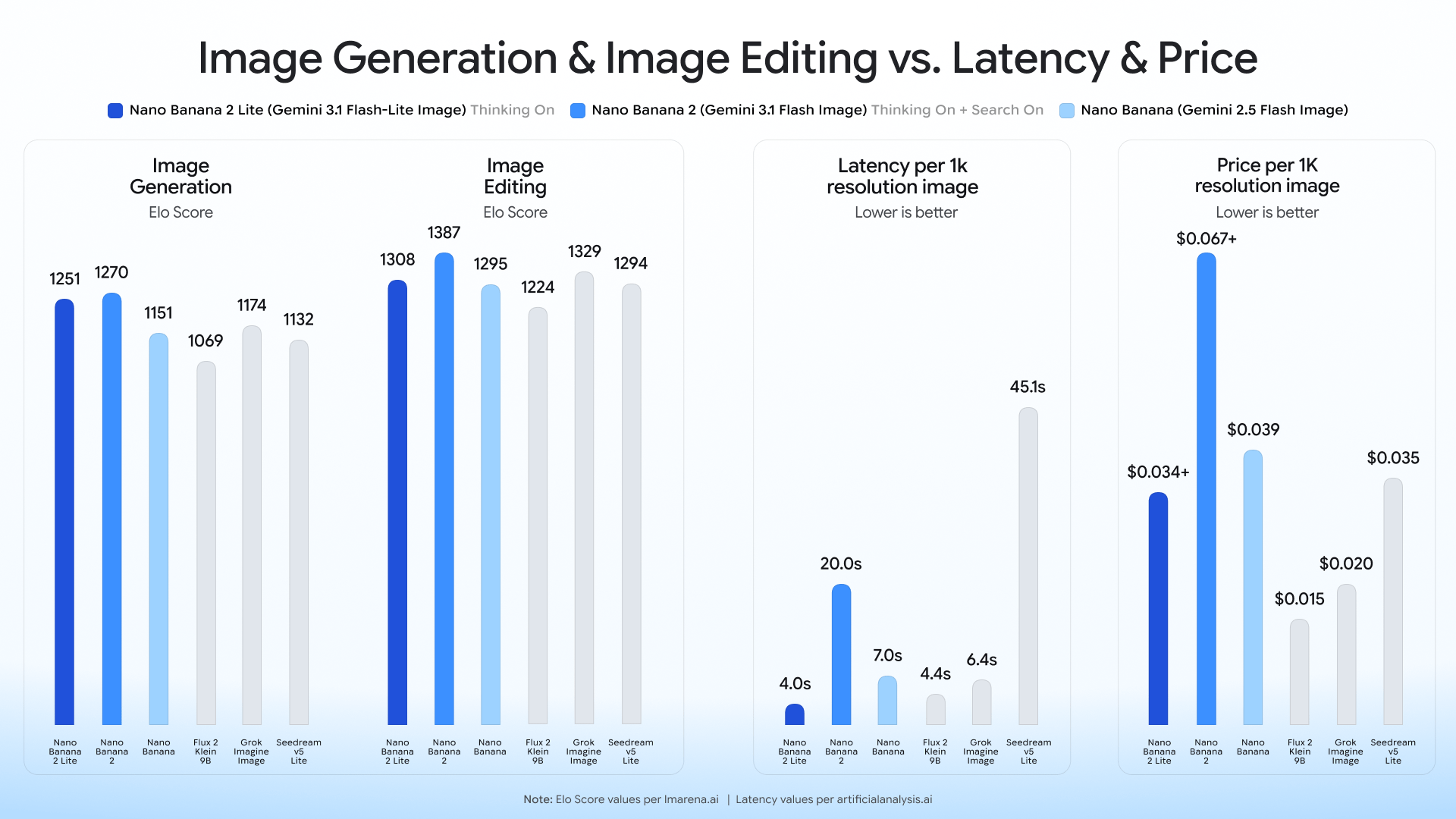
Nano Banana 2 Lite is the new low-cost speed lane in Nenis. It is built for the part of the creative process where you need more attempts, not more ceremony: thumbnail directions, product scene tests, background changes, quick references, and batches of visual ideas.
In Nenis, a Nano Banana 2 Lite output costs 3 credits at Low or 4 credits at Standard. It replaces the original Nano Banana with a newer Gemini model that Google positions as faster, cheaper, and better.
The Short Version
Choose Nano Banana 2 Lite when:
- You want the cheapest Gemini image option in Nenis.
- The asset is a draft, concept, thumbnail, moodboard, or social experiment.
- You need up to 14 references without paying for a Pro output.
- You want 1 to 4 variations from one job.
- 512px or 1K output is enough for the current stage.
- Speed matters more than 2K or 4K finish.
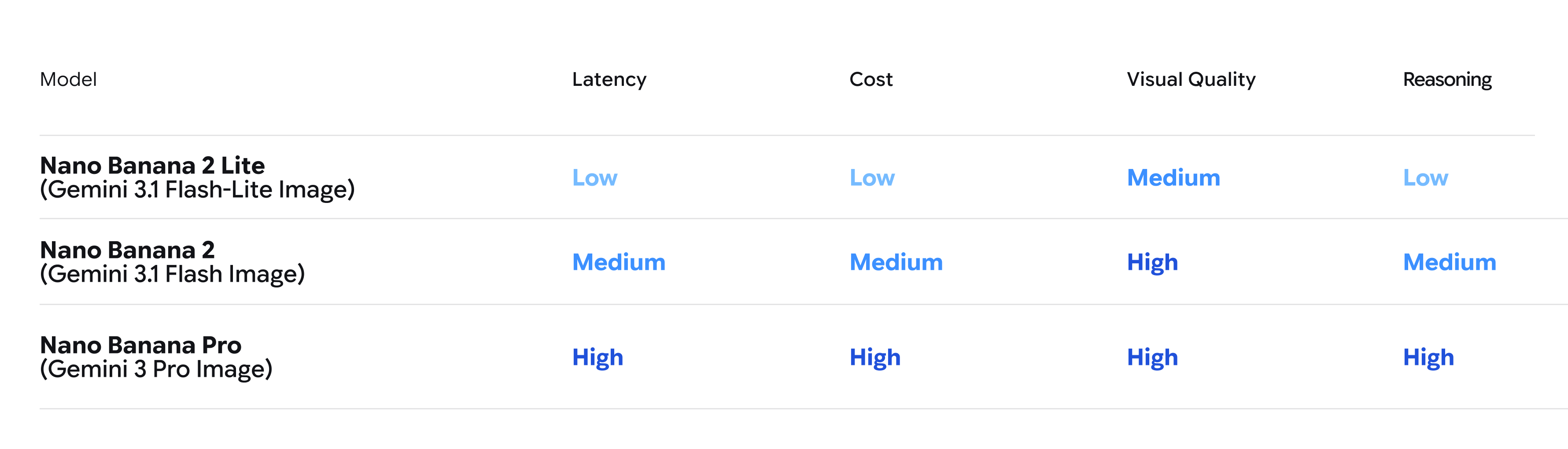
Choose Nano Banana 2 for stronger all-around output and more resolution choices. Choose Nano Banana Pro when control and final quality matter more than cost.
What Nenis Exposes
| Control | Nenis support |
|---|---|
| Low | 512px, 3 credits per output |
| Standard | 1K, 4 credits per output |
| Outputs | 1 to 4 per job |
| Reference images | Up to 14 |
| Aspect ratios | 1:1, 3:2, 2:3, 3:4, 4:3, 4:5, 5:4, 9:16, 16:9, 21:9 |
| Output format | JPG |
| Search controls | Not available for this model in Nenis |
Nano Banana 2 Lite reasons internally, but Nenis intentionally does not show Google Search or image-search controls for it because the model does not support those grounded modes.
Why It Replaces the Original Nano Banana
Google calls the first Nano Banana—Gemini 2.5 Flash Image—a legacy model and recommends Nano Banana 2 Lite as its replacement. The launch announcement says the new Lite model improves quality, speed, and cost while retaining useful prompt adherence, character consistency, and legible in-image text.
That is a clean upgrade for Nenis users. You no longer need to choose an older model just to keep the workflow cheap.
Google's published vendor benchmark reports roughly four seconds for text-to-image generation at 1K. That is a vendor measurement, not a promise about the full Nenis job time: upload size, queue load, number of outputs, and network conditions still affect the end-to-end wait.
Best Use 1: Rapid Ideation
Lite is most valuable before you know exactly what you want.
Use it to test:
- Several thumbnail compositions.
- Product backgrounds and camera angles.
- Color and lighting directions.
- Character poses or environments.
- Social crops before writing final copy.
- A template with different subjects or moods.
Prompt example:
Create four distinct 16:9 thumbnail concepts for a video about restoring a small city apartment.
Keep the room recognizable.
Vary only the camera angle, lighting, and focal point.
Use bold visual contrast and leave clear negative space for a headline.
Do not place text in the image.
Generate four only when the directions are genuinely useful. If you are testing one small change, one or two outputs usually teach you enough.
Best Use 2: Cheap Reference Work
Up to 14 reference images is unusually generous for a low-cost model. It makes Lite useful for rough campaign systems, product concepts, character explorations, and style studies.
More references do not automatically create more control. Give each one a role:
Use image 1 as the exact product reference.
Use images 2 and 3 for the room style.
Use image 4 only for the color palette.
Use image 5 only for the camera angle.

Create a 4:5 lifestyle product image.
Keep the product shape, cap, label position, and main color unchanged.
Do not copy objects or text from the style references.
If the product still drifts, reduce the reference set. A clearer brief with four useful images can outperform fourteen loosely related ones.
Best Use 3: Everyday Image Edits
Nano Banana models are useful for conversational visual changes. Lite is a good choice when an edit is exploratory or disposable:
- Replace a background.
- Change a room's material palette.
- Restyle a portrait for a moodboard.
- Put a product into several environments.
- Try a different crop and lighting direction.
- Remove visual clutter by regenerating the scene.
Use a preservation line:
Edit this image into a warm editorial cafe portrait.
Keep the person's face, hairstyle, expression, pose, and clothing recognizable.
Change only the environment and lighting.
Use a natural 3:4 portrait crop.
Do not add other people or alter facial structure.
For a final identity-sensitive asset, review carefully or move the best draft to Nano Banana 2 or Pro.
The Gemini Image Family in Nenis
| Model | Current Nenis credits | Resolution choices | Best role |
|---|---|---|---|
| Nano Banana 2 Lite | 3 Low, 4 Standard | 512px, 1K | Fast drafts and inexpensive iteration |
| Nano Banana 2 | 6 Low, 8 Standard, 12 High, 18 Ultra | 512px to 4K | Balanced everyday generation and editing |
| Nano Banana Pro | 16 Standard/High, 28 Ultra | 1K to 4K | Complex, professional, high-control work |
The model names suggest a quality ladder, but the better mental model is a workflow:
- Lite discovers the direction.
- Nano Banana 2 develops it.
- Pro finishes it.
You do not need all three for every image. If Lite produces a result that is already suitable for its destination, stop there.
Where Lite Is the Wrong Choice
Move up when:
- You need 2K or 4K output.
- A public-facing wordmark, label, or headline must be especially reliable.
- The prompt has many brand and layout constraints.
- You need web or image-search grounding in Nenis.
- The result will be a final paid advertisement or product-page hero.
- Subtle realism or complex materials are central to the brief.
Lite is optimized around speed and cost. Asking it to behave like a 28-credit Pro output is usually a false economy.
A Prompt Formula for Lite
Keep the prompt focused enough that a fast model can execute it cleanly:
Create [asset type] for [use case].
Subject: [main subject or reference].
Reference roles: [what each uploaded image controls].
Composition: [crop, camera angle, negative space].
Style: [lighting, material, color, mood].
Preserve: [identity, geometry, logo area, room layout].
Avoid: [extra objects, changed subject, clutter, unapproved text].
Output: [aspect ratio], [Low or Standard].
Good Lite prompts make one visual decision at a time. Once the direction is right, add constraints or move up the family.
The takeaway
Nano Banana 2 Lite gives Nenis a better default for cheap Gemini image work.
It replaces the original Nano Banana, supports far more references, offers useful 512px and 1K choices, and costs only three or four credits per output. That makes it the model to reach for when iteration itself is the work.
Use Lite to find the idea. Spend more only when the idea is worth finishing.
Sources and image credits
Model claims and images come from Google's official Nano Banana 2 Lite launch announcement and Gemini image generation documentation. Nenis controls and credit prices reflect the live Nenis model catalogue on August 20, 2026.